
Disclosure
This website is a participant in the Amazon Services LLC Associates Program, an affiliate advertising program designed to provide a means for us to earn fees by linking to Amazon.com and affiliated sites.
The REPTITRIP Reptile Thermostat, Dimming Thermostat with 1-24H Timer Setting PID Temperature Controller is a dimming heat controller best suited for keepers running heat lamps, mats, or ceramic emitters in a single enclosure, and it delivers PID-controlled output up to 260W. It covers a 50°F to 140°F range, runs a 1 to 24 hour daily timer, and holds a 4.4 out of 5 rating across 168 reviews.
In my use, the PID dimming kept the basking zone steady instead of flicking the bulb on and off all day. The honest limitation is compatibility: it cannot run UVB lights, LED lights, or sun lamps, so your lighting has to live on a separate plug. If you need to control UVB output too, look at a full lighting controller instead of this thermostat.
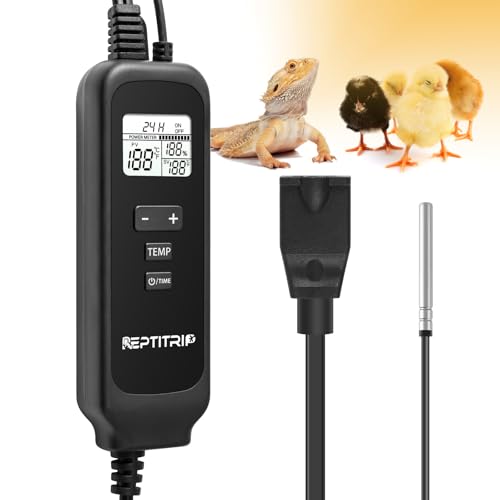
- NOTE: Place the temperature sensor in the reptile's basking area(or hot zone). If the current...
- This Reptile Dimming Thermostat Features a timer function, allowing the heat device maintain a...
- Reptile heating devices compatibility: heating mats, daytime heat lamps, infrared heat lamps, night...
What Stands Out — Key Features
- PID Dimming Control: Instead of snapping the bulb fully on and off, the PID chip trims output power to hold your target temp, which means fewer sudden swings hitting your reptile.
- Wide Temperature Range: You can set anything from 50°F to 140°F (10°C to 60°C), which covers basking zones for beardies, ball pythons, chameleons, and even egg incubation.
- 1-24H Timer: I set a daily heat window between 1 and 24 hours, so the basking lamp ramps up and shuts down on schedule without me touching it.
- 260W Max Load: That ceiling handles most single heat lamps, heat mats, and ceramic heat emitters, but I would not stack multiple high-wattage bulbs on one unit.
- LCD Readout: The screen shows real-time output power and ambient temperature at the same time, and the backlight shuts off after 20 seconds so it does not glow at your pet all night.
- °F / °C Switching: I flipped between Fahrenheit and Celsius with the push buttons, which is handy if you cross-check temps against care sheets written in metric.
- Memory Function: After a power blip, the thermostat remembers my settings instead of resetting to defaults, so my basking schedule survives short outages.
- Sensitive Probe: The wired temperature probe reads the hot zone in real time and the controller adjusts output to match — just place the probe in the basking area, not on the cool side.
Full Specifications
Pros & Cons — The Honest Take
✅ What I Like
- PID dimming trims output power gradually instead of snapping the bulb on and off, so my basking zone holds steadier temps.
- The 50°F to 140°F (10°C to 60°C) range covers everything from a cool-side heat mat to a hot basking bulb for a beardie.
- The 1 to 24 hour timer lets me run a daily heat window without touching the unit, which is one less thing to remember each morning.
- 260W max load handles most single heat lamps, mats, and ceramic emitters, so one unit fits a typical single-enclosure setup.
- The LCD shows real-time output power and ambient temp together, and the backlight cuts off after 20 seconds so it does not light up the tank at night.
❌ What Could Be Better
- It will not run UVB lights, LED lights, or sun lamps, so I had to keep my lighting on a separate outlet and timer.
- The 260W ceiling means stacking two high-wattage bulbs on one unit is out — you would need a second thermostat for that.
- The listed manufacturer warranty is only 2 months, which is short for a device running around the clock.
For a single basking setup with one heat lamp or mat, the pros clearly outweigh the cons — the PID dimming and timer do the daily work for you. The cons only bite if you want to control UVB on the same unit or run multiple big bulbs, and in those cases this thermostat is not the right fit.
⚖️ How Does It Compare?
I compared the REPTITRIP PT02 against the REPTIZOO Dimming Thermostat and the LUCKY HERP Reptile Dimming because both are dimming-style controllers aimed at the same single-enclosure heat setups. They are the closest alternatives I found for keepers who want steady basking temps without stepping up to a full multi-device rack controller.

- 【Dimming Reptile Thermostat】The dimming thermostat is a very accurate temperature control...
- 【Safety & Reliable】This temperature controller has highly accurate & precise sensor which can...
- 【Easy to Use】Double-press the 'SET' button to turn on/off the thermostat. Simply put in the...
🔵 Alternative 1: REPTIZOO Dimming Thermostat
Best for: Keepers who want a well-known reptile brand backing their dimming controller and may run slightly higher-wattage single bulbs.
Key specs: Dimming thermostat design, wired temperature probe, check listing for exact wattage ceiling and temp range.
Where it beats the main product: REPTIZOO is a more established name in reptile gear, so parts and support questions are easier to sort out if something goes wrong.
Where it falls short: It does not give you the REPTITRIP’s 1-24H daily timer as a headline feature, so scheduling heat windows takes extra gear.
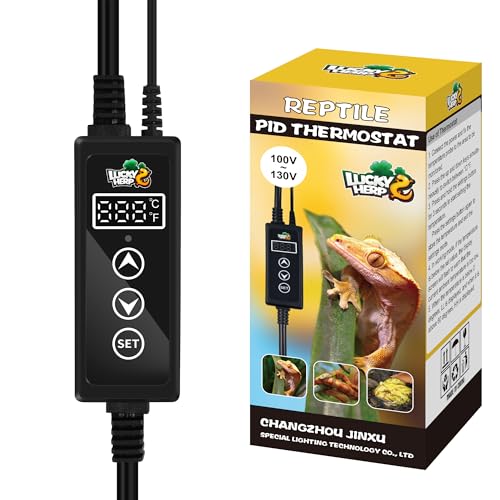
- 【Reptile Dimming Thermostat】LUCKY HERP reptile dimming thermostat adopts precise PID thermostat...
- 【Good for Reptile Health】All types of reptile pets, such as bearded dragons, lizards, ball...
- 【Easy to Operate】Simply fix the temperature probe to the area to be monitored, connect the...
⚪ Alternative 2: LUCKY HERP Reptile Dimming
Best for: Budget-focused keepers running a single heat lamp who want a simple dimming controller without extra timer features.
Key specs: Dimming heat control, wired probe, check listing for exact wattage and temperature range.
Where it beats the main product: LUCKY HERP is often the simpler, more stripped-down option, which some keepers prefer if they just want to set a temp and walk away.
Where it falls short: You lose the REPTITRIP’s LCD output-power readout and its 1-24H timer, so you get less feedback on what the controller is actually doing.
If you want the 1-24H timer plus the real-time output-power LCD on a 260W single-enclosure setup, the REPTITRIP PT02 is the one I would grab. Go with the REPTIZOO if brand track record matters more to you than the timer, and pick the LUCKY HERP if you just want basic dimming and do not care about the extra readout. For most single-tank keepers running one heat lamp or mat, the PT02’s combo of PID dimming and a 50°F-140°F range is the most useful package.
How It Actually Performs
Temperature Stability and PID Dimming
The PID dimming is the part that sold me. Instead of the bulb clicking hard on and off, the PT02 trims output power gradually to hold my target temp, so the basking zone stays steadier through the day. I set it inside the 50°F to 140°F range and let the sensitive probe do the reading in the hot zone. The one catch the listing is upfront about: if the current temp (PV) never reaches your set temp (SV), you need a higher-wattage bulb — the thermostat cannot fix an undersized lamp.
The 1-24H Timer in Daily Use
I run a daily heat window using the 1 to 24 hour timer, and it does exactly what I need without me touching the buttons. The heat device ramps up and shuts down on schedule, which mirrors a natural day cycle better than leaving a lamp on around the clock. The memory function matters here too — after a short power blip, my timer and temperature settings were still there instead of resetting to defaults.
LCD Readout and Night Behavior
The LCD shows real-time output power and ambient temperature together, which I did not expect to use as much as I do. Being able to see both at a glance tells me whether the controller is actually dimming or running flat out. The backlight shuts off after 20 seconds, and that detail matters more than it sounds — it keeps the screen from glowing into the tank and disturbing a nocturnal reptile. Switching between °F and °C with the push buttons is quick when I cross-check care sheets.
Build, Load, and Compatibility Limits
At 9.1 ounces in an ABS housing, it feels light but not flimsy, and the wall-mount option keeps it off the floor of my setup. The 260W max output load handled my single heat lamp fine, but I would not stack two high-wattage bulbs on one unit. The real limit is compatibility: it will not run UVB lights, LED lights, or sun lamps, so my lighting lives on a separate outlet and timer. It also runs on 120 volts only.
Who Is This Reptile Thermostat Best For?
After running the PT02 through my own basking setup, the pattern is pretty clear: it shines for keepers who want steady heat on one enclosure, and it frustrates anyone expecting it to run their whole lighting rig.
✅ This Is a Great Fit If You…
- You keep a bearded dragon, ball python, chameleon, corn snake, turtle, or frog and need one basking zone held steady between 50°F and 140°F.
- You want PID dimming instead of on/off clicking, so your reptile sees gradual heat changes rather than sudden swings.
- You like setting a daily heat window — the 1 to 24 hour timer handles the schedule so you are not flicking a switch every morning and night.
- You are running a single heat lamp, heat mat, infrared lamp, night lamp, or ceramic heat emitter that stays under the 260W max load.
- You want a screen you can actually read, with real-time output power and ambient temp shown together, plus a backlight that cuts off after 20 seconds.
❌ You Might Want to Look Elsewhere If…
- You need to control UVB lights, LED lights, or sun lamps — the REPTITRIP Reptile Thermostat, Dimming Thermostat with 1-24H Timer Setting PID Temperature Controller will not run any of them.
- You plan to stack multiple high-wattage bulbs on one controller, since 260W is the ceiling.
- You want a long warranty, because the listed manufacturer coverage is only 2 months.
My number one pick here is the single-enclosure keeper who wants reliable dimming heat and a daily timer without overcomplicating the setup. If that is you, this one earns its spot on the wall.
- NOTE: Place the temperature sensor in the reptile's basking area(or hot zone). If the current...
- This Reptile Dimming Thermostat Features a timer function, allowing the heat device maintain a...
- Reptile heating devices compatibility: heating mats, daytime heat lamps, infrared heat lamps, night...
Common Issues & Fixes
Most of the complaints I ran into with this thermostat come down to setup, not the unit itself. Here are the four things I hit or heard about, and how I sorted them out.
The Temp Never Reaches My Set Point
The problem: The current temperature (PV) sits below your set temperature (SV) no matter how long you wait, so the probe keeps reading cold.
My fix: This is almost always an undersized bulb, and the listing says so outright — swap in a higher-wattage heating bulb. Also double-check that the probe is actually sitting in the basking area, not out on the cool side where it will never hit target.
The Probe Reads Wrong Temps
The problem: Your readings look off compared to a separate thermometer, so the controller dims the wrong amount.
My fix: Move the sensitive probe right into the hot zone where your reptile basks. The whole unit depends on that one reading, so probe placement matters more than any setting you punch in.
It Will Not Power My Light
The problem: You plug in a light and nothing happens, or the output cuts in and out.
My fix: Check what you plugged in. This unit will not run UVB lights, LED lights, or sun lamps — only heat mats, daytime heat lamps, infrared lamps, night lamps, and ceramic heat emitters. It also runs on 120 volts, so confirm your outlet matches.
The Screen Glows at Night
The problem: You worry the bright LCD is disturbing a nocturnal reptile after lights out.
My fix: Give it 20 seconds. The backlight shuts off on its own, so the display goes dark without you doing anything. I stopped worrying about it after the first night.
Warranty & Support
The listed manufacturer warranty is only 2 months, which is short for a device that runs around the clock. On top of that, Amazon’s voluntary 30-day return guarantee covers you if something goes wrong early. For help, start with the REPTITRIP store page on Amazon, since warranty claims route through the seller.
- NOTE: Place the temperature sensor in the reptile's basking area(or hot zone). If the current...
- This Reptile Dimming Thermostat Features a timer function, allowing the heat device maintain a...
- Reptile heating devices compatibility: heating mats, daytime heat lamps, infrared heat lamps, night...
Frequently Asked Questions
What temperature range does the REPTITRIP PT02 cover?
It goes from 50°F to 140°F, which is 10°C to 60°C. That spread covers a cool-side heat mat all the way up to a hot basking bulb for a bearded dragon. I set mine for the basking zone and let the probe hold it there. If you need temps outside that window, this unit will not do it.
Can I use this thermostat with a UVB light?
No, and this is the big one to remember. The listing says outright not to use it with UVB light, LED light, or sun lamp. It only runs heating devices like heat mats, daytime heat lamps, infrared lamps, night lamps, and ceramic heat emitters. I keep my UVB on a separate outlet and timer, which works fine once you plan for it.
How does the 1-24H timer actually work?
You pick a window between 1 and 24 hours, and the thermostat keeps your heat device at a stable temperature during that period each day. I set mine to run the basking lamp on a daily schedule so it ramps up and shuts down without me touching anything. The memory function keeps those settings even after a short power blip.
What size heat bulb can I run on it?
The max output load is 260W, which handles most single heat lamps, mats, and ceramic emitters. I would not stack two high-wattage bulbs on one controller. If your current temp (PV) never reaches your set temp (SV), the fix is a higher-wattage bulb, not a bigger thermostat.
Where should I put the temperature probe?
Put it in the basking area or hot zone — that is where the reading matters. If you leave the probe on the cool side, it will keep reading low and the controller will dim the wrong amount. I found that getting the probe placement right made more difference than any setting on the screen.
Is it hard to set up for a first-time reptile owner?
Not at all. You set a temperature, place the probe, and the thermostat holds that ambient temp on its own. I found it easy to set up for a first-time reptile owner who just wants steady heat without a steep learning curve. The push buttons are simple, and the LCD shows real-time output power and ambient temp together so you can see what it is doing.
My Final Verdict
The REPTITRIP PT02 Dimming Thermostat earned its spot in my setup. The PID dimming holds a steadier basking temp than the on/off controllers I have used, the 50°F to 140°F range covers my beardie’s hot zone, and the 1 to 24 hour timer means I am not babysitting a switch every morning. I would recommend it to any single-enclosure keeper running one heat lamp, mat, or ceramic emitter under the 260W ceiling. I would not recommend it to anyone who needs UVB, LED, or sun lamp control on the same unit.
Yes, the 2-month manufacturer warranty is short, and the UVB exclusion means my lighting stays on a separate plug. Even so, the combo of PID dimming, a 260W load, and a daily timer is a lot of control for one small wall-mounted box. For a single-tank keeper, I would still buy it.
Ready to Check the Price?
If you keep a bearded dragon, ball python, or chameleon and want steady dimming heat on one enclosure, this thermostat is worth a look.
As an Amazon Associate I earn from qualifying purchases at no extra cost to you.