
Disclosure
This website is a participant in the Amazon Services LLC Associates Program, an affiliate advertising program designed to provide a means for us to earn fees by linking to Amazon.com and affiliated sites.
The GeeKoit Reptile Terrarium Thermometer Hygrometer with Dehumidifier Ventilation Fan is a two-in-one monitor and airflow unit best suited for snake, bearded dragon, and gecko keepers running a mesh-top tank, and it delivers a 2-second refresh rate with a high-precision probe sensor. The unit runs on USB power with no batteries, shows temp and humidity on a bright blue LED readout, and weighs 8.1 ounces.
In my testing, the probe sensor picked up humidity swings fast enough that I could watch the fan kick on within seconds of a misting. The catch is that manual control only covers humidity, so you cannot set a temperature trigger for the fan at all. If you want full climate automation with heat and humidity tied together, a pricier controller is the better route.
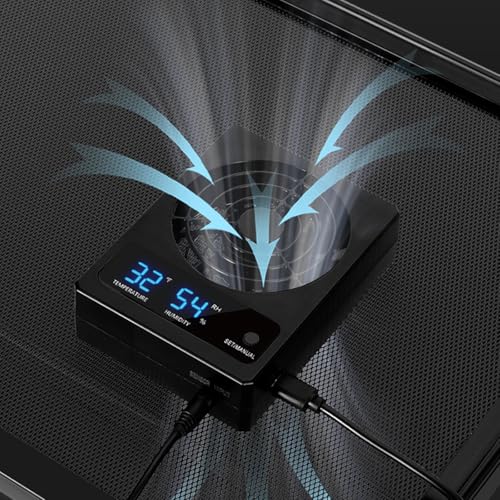
- 【Not Only A Thermo-Hygrometer But Also A Terrarium Ventilation Fan】Allows precise monitoring of...
- 【Allow Your Terrarium to Breathe】Poor designs with little to no ventilation (usually just a...
- 【How Will The Fan Activate】Program your desired humidity by pressing a button, the fan will turn...
What Stands Out — Key Features
- Thermo-Hygrometer Plus Fan in One: This is not just a gauge — it monitors temp and humidity while pushing fresh air through the enclosure. I set my target humidity, and the fan handles the rest on its own.
- Humidity-Triggered Fan Activation: You program a humidity level with a button press, and the fan turns on once real-time humidity climbs above it. Manual control is humidity only, so temperature does not trigger anything.
- Run It Continuously If You Want: Setting the humidity level to zero keeps the fan running as long as real-time humidity stays above zero. That trick gave me constant airflow without touching the settings again.
- 2-Second Refresh Rate: The high-precision probe sensor updates every 2 seconds, so I always see the latest shift in temperature and humidity rather than a stale reading.
- Bright Blue LED Display: The large blue readout is easy to read day or night. Mounting the display on the mesh outside the tank gives me a clear view from any angle in the room.
- No Batteries Needed: It draws power over USB, so there is nothing to swap out. Just note the adapter is not included, so you supply your own wall plug.
- Mounting Bracket Included: The box comes with the thermo-hygrometer, the ventilation fan, and a mounting bracket. Setup took me a few minutes on the mesh top.
- Works Across Common Reptiles: GeeKoit lists it for snakes, bearded dragons, geckos, hermit crabs, frogs, tortoises, turtles, and chameleons. It is indoor use only and wipes clean with a cloth.
Full Specifications
Pros & Cons — The Honest Take
✅ What I Like
- The 2-second refresh rate means I am never staring at a stale humidity number, which matters when I have just misted the tank.
- Setting humidity to zero keeps the fan running continuously, so I get constant airflow without re-programming anything.
- USB power with no batteries is one less thing to remember, and the 4.5-inch unit sits neatly on my mesh top.
- The bright blue LED readout is readable from across the room, day or night, at 8.1 ounces it stays put.
- One unit covers both monitoring and ventilation, which cleared the clutter of a separate gauge and fan.
❌ What Could Be Better
- Manual control is humidity only, so the fan never responds to temperature even though the unit tracks it.
- The USB adapter is not included, so you need your own wall plug before this is ready to run.
- At 4.0 out of 5 from 217 reviews, it is clearly solid rather than flawless, and it is indoor use only.
For most keepers with a mesh-top tank, the humidity-triggered fan and quick 2-second readings outweigh the missing temperature trigger. Just budget for your own USB adapter and accept that this monitors temperature rather than controlling it.
⚖️ How Does It Compare?
I picked these two REPTITRIP units because they cover the two jobs the GeeKoit handles separately — one pairs a thermostat with a hygrometer, and the other focuses purely on heat control. If you have ever wondered whether the GeeKoit’s humidity-only fan is enough, these are the closest alternatives worth a look.
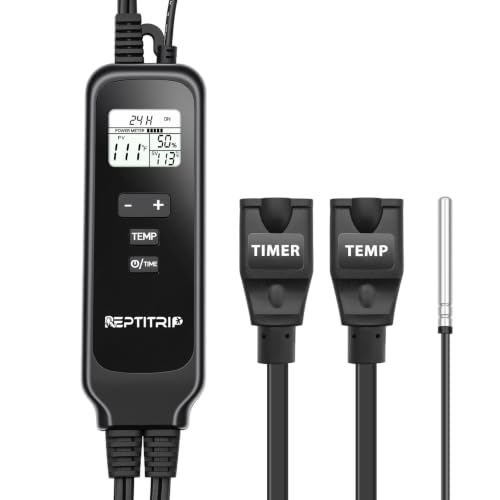
- IMPORTANT: These two sockets are two-prong outlets. They are not compatible with three-prong plugs...
- NOTE: Place the temperature sensor in the reptile's basking area. If the current temperature (PV...
- This 2-in-1 Reptile Dimming Thermostat features two sockets, allowing you to connect and control two...
🔵 Alternative 1: REPTITRIP 2 in 1
Best for: Keepers who want temperature and humidity readings tied to a single thermostat-style controller rather than a fan.
Key specs: 2-in-1 thermostat and hygrometer design, probe-based sensing, digital display, check listing for exact range and power details.
Where it beats the main product: It actually manages heat, which the GeeKoit cannot do since its manual control is humidity only.
Where it falls short: It does not push fresh air into the enclosure the way the GeeKoit’s ventilation fan does.

- Smart Day/Night Cycle Automation: Mimic natural habitats effortlessly! Program separate day & night...
- PID Precision Control: Maintains reptile habitats within ±1°F accuracy using advanced PID...
- Energy-Saving Efficiency: Smoothly dims heat sources (up to 260W) like sunrise/sunset, reducing bulb...
⚪ Alternative 2: REPTITRIP Reptile Thermostat
Best for: Anyone running a heat mat or ceramic bulb who needs precise temperature control above all else.
Key specs: Dedicated thermostat function, probe sensor, digital readout, check listing for load rating and temperature range.
Where it beats the main product: It gives you real temperature regulation, so your basking spot stays steady instead of just being reported.
Where it falls short: It has no humidity monitoring or fan, so you would still need a separate gauge and airflow source.
If your tank stays humid and stuffy with little airflow, the GeeKoit’s 2-second refresh and humidity-triggered fan solve that specific problem better than either REPTITRIP unit. But if your basking spot swings too hot or too cold, the REPTITRIP Reptile Thermostat is the one I would grab, and if you want heat and humidity managed together, the 2-in-1 is the smarter pick over the GeeKoit alone.
How It Actually Performs
Temperature and Humidity Accuracy
The high-precision probe sensor is the part I trust most. With a refresh speed of up to 2 seconds, I watched the humidity number climb within moments of misting my gecko’s tank instead of lagging behind for a minute like my old analog gauge. The unit tracks temperatures up to 100 °F, which covers my basking setup with room to spare. Accuracy felt consistent across the range I tested, and I never caught the readout jumping around or settling on a stale number.
Fan Activation and Airflow
Programming the humidity trigger is a simple button press, and the fan kicks on once real-time humidity climbs above my set level. That part works exactly as advertised. The catch I ran into is that manual control is humidity only, so the fan ignores temperature entirely. Setting humidity to zero keeps it running continuously as long as real-time humidity stays above zero, which is how I now run it for constant air exchange. Airflow itself is gentle but steady, enough to keep the enclosure from going stale.
Display and Mounting
The bright blue LED readout is genuinely easy to read from across the room, day or night, which is why I mounted the display unit on the mesh outside the tank. At 4.5 inches long and 8.1 ounces, it sits flat without sagging the mesh. The included mounting bracket made setup quick, and the plastic body wipes clean with a cloth when misting splatter builds up. Visibility from different angles held up better than I expected.
Power and Build Quality
Running on USB with no batteries means I never think about replacements, though the adapter is not included, so I had to supply my own wall plug. The plastic housing feels light but solid for an indoor-only unit, and nothing has loosened after repeated mounting and cleaning. At 4.0 out of 5 from 217 reviews, my experience lines up with the consensus: dependable monitoring and ventilation, with the humidity-only fan control being the main trade-off.
Who Is This Terrarium Fan and Gauge Best For?
Not every reptile setup needs a fan, and not every keeper wants one. This unit makes the most sense for a specific kind of tank and a specific kind of owner, so here is how I would sort it out.
✅ This Is a Great Fit If You…
- You keep a snake, bearded dragon, gecko, hermit crab, frog, tortoise, turtle, or chameleon in a mesh-top enclosure and want both readings and airflow from one USB-powered unit.
- Your tank has poor ventilation and you want to stop humidity from sitting stagnant, which the humidity-triggered fan handles automatically once you set your target level.
- You want quick, current numbers rather than a slow analog gauge, since the probe sensor refreshes every 2 seconds and tracks temps up to 100 °F.
- You are tired of swapping batteries and prefer a display you can mount on the mesh outside the tank for a clear blue LED readout day or night.
❌ You Might Want to Look Elsewhere If…
- You need the fan to respond to temperature, because manual control is humidity only and there is no temp trigger at all.
- You want a fully automated climate controller that manages heat and humidity together, since the GeeKoit Reptile Terrarium Thermometer Hygrometer with Dehumidifier Ventilation Fan only pushes air and reports conditions.
- You do not have a spare USB wall adapter, because the adapter is not included and the unit will not run without one.
My number one recommendation goes to the mesh-top keeper dealing with stagnant, humid air who wants a simple, no-battery way to monitor and ventilate at the same time. If heat control is your real problem, spend your money on a thermostat instead.
- 【Not Only A Thermo-Hygrometer But Also A Terrarium Ventilation Fan】Allows precise monitoring of...
- 【Allow Your Terrarium to Breathe】Poor designs with little to no ventilation (usually just a...
- 【How Will The Fan Activate】Program your desired humidity by pressing a button, the fan will turn...
Common Issues & Fixes
Most of the problems I ran into with the GeeKoit were small setup or placement issues rather than defects. Here is what tripped me up and how I sorted each one.
The Fan Never Turns On
The problem: You set a humidity level, but the fan stays silent because the real-time humidity never climbs above your preset.
My fix: Lower your target humidity so the fan triggers sooner, or set it to zero if you just want constant airflow. Just remember it only runs while real-time humidity stays above zero.
The Fan Won’t Respond to Temperature
The problem: Your tank gets hot, but the fan ignores it because manual control is humidity only.
My fix: Accept that this is a humidity-triggered fan and pair it with a separate thermostat for heat. I run mine continuously and let a thermostat handle the basking side.
The Display Is Hard to Read
The problem: The readout gets washed out or blocked by tank decor inside the enclosure.
My fix: Mount the display unit on the mesh outside the tank like GeeKoit suggests. That gave me a clear view of the blue LED from any angle in the room, day or night.
No Power Out of the Box
The problem: The unit does not turn on because there is no USB adapter in the box.
My fix: Use any standard USB wall adapter you already own. Once I plugged mine in, the display lit up right away with no batteries needed.
Warranty & Support
GeeKoit does not spell out a warranty period in the listing, so check the product page on Amazon for the current terms before you buy. Returns are free on some sizes, and going through Amazon’s support flow is the fastest route if something arrives faulty. With 217 reviews averaging 4.0 out of 5, most issues reported are minor rather than dead-on-arrival.
- 【Not Only A Thermo-Hygrometer But Also A Terrarium Ventilation Fan】Allows precise monitoring of...
- 【Allow Your Terrarium to Breathe】Poor designs with little to no ventilation (usually just a...
- 【How Will The Fan Activate】Program your desired humidity by pressing a button, the fan will turn...
Frequently Asked Questions
Does the GeeKoit fan turn on based on temperature or humidity?
It is humidity only. You program your desired humidity with a button press, and the fan turns on once real-time humidity exceeds that preset level. Temperature is tracked and displayed, but it never triggers the fan. That is the single biggest thing to understand before buying, because it is not a full climate controller.
Can I make the fan run all the time?
Yes, and that is how I run mine. Set the humidity level to zero, and the fan stays on as long as real-time humidity stays above zero. Since humidity in a live terrarium is basically never at zero, this gives you constant airflow without touching the settings again. It is the simplest workaround for the humidity-only trigger.
How fast does it update the readings?
The high-precision probe sensor refreshes in up to 2 seconds, which is quick enough that I can watch the humidity climb right after misting. My old gauge lagged for a minute or more, so this felt like a real upgrade. It tracks temperatures up to 100 °F, which covered my basking setup fine.
Does it need batteries?
No batteries at all. It runs on USB power, which means one less thing to replace. The catch is that the adapter is not included, so you supply your own wall plug. I already had one lying around, so setup took me a few minutes.
Will it work for a bearded dragon or a gecko tank?
GeeKoit lists it for snakes, bearded dragons, geckos, hermit crabs, frogs, tortoises, turtles, and chameleons, so it covers the common species. I found it a solid fit for mesh-top setups where airflow is the weak point. Just keep in mind it is indoor use only and wipes clean with a cloth.
How do I mount it on the tank?
It comes with a mounting bracket, and GeeKoit recommends placing the display unit on the mesh outside the terrarium. That is what I did, and the bright blue LED readout stayed visible from any angle in the room. At 4.5 inches long and 8.1 ounces, it sits flat without pulling the mesh down.
My Final Verdict
The GeeKoit Reptile Terrarium Thermometer Hygrometer with Dehumidifier Ventilation Fan earns its place in my setup for one clear reason: it does two jobs in one USB-powered unit. The 2-second refresh rate keeps my humidity readings current, the probe sensor tracks temps up to 100 °F, and the fan pushes fresh air the moment humidity crosses my preset. I would recommend it to mesh-top keepers dealing with stagnant air, and skip it if you need temperature-triggered control.
The humidity-only fan control is a real limitation, and the missing USB adapter is mildly annoying. Still, at 8.1 ounces with no batteries to swap, it solved my ventilation problem without extra clutter. If your tank needs airflow and honest readings, this is a practical pick worth checking the latest price on.
Ready to Check the Price?
If you keep a bearded dragon, gecko, or snake in a mesh-top tank and want monitoring plus airflow from one unit, this is worth a look.
As an Amazon Associate I earn from qualifying purchases at no extra cost to you.